Cryomech control center
The Cryomech control center is a standalone application, built on top of Atomize, that monitors and controls the cryogenic system. It supervises the helium compressor, the liquid-helium level, and the cold-head temperature of the closed-cycle cryostat, automates the compressor duty cycle, keeps a long-term log of every reading, and exposes remote monitoring and control through a Telegram bot.
All instrument communication reuses the standard Atomize device modules; the control center only adds the dedicated GUI, the automation logic, and the logging/bot layer on top.
Monitored and controlled hardware
| Component | Model | Role |
|---|---|---|
| Helium compressor | Cryomech CPA1110 (RS-485) | Status, water/oil/helium temperatures, pressures, motor current, operating hours; start/stop |
| Liquid-helium level monitor | Cryomagnetics LM-510 (TCP/IP Socket) | Helium level, pressure, heater power; HRC set point |
| Cold-head temperature | Scientific Instruments SCM10 (TCP/IP Socket, RS-232) | Cold-head temperature |
| Temperature controller | Lakeshore 340 (GPIB, RS-232) — optional | Sample temperatures (A / C), setpoint, heater power and range |
| Moisture meter | IVG-1/1 (RS-485) — optional | Cooling-water moisture |
The Lakeshore 340 and the IVG-1/1 are optional: if either device is not wired up, the control center bypasses it and keeps running with the remaining instruments, greying out the controls that are not actionable.
Cryomech Control window
The main window polls every connected device on a 5 s timer (all instrument I/O runs on a background thread so the GUI never freezes mid-read) and refreshes the live readouts. A reading from a dead instrument shows as — and only blanks its own labels — the rest of the rig keeps updating.
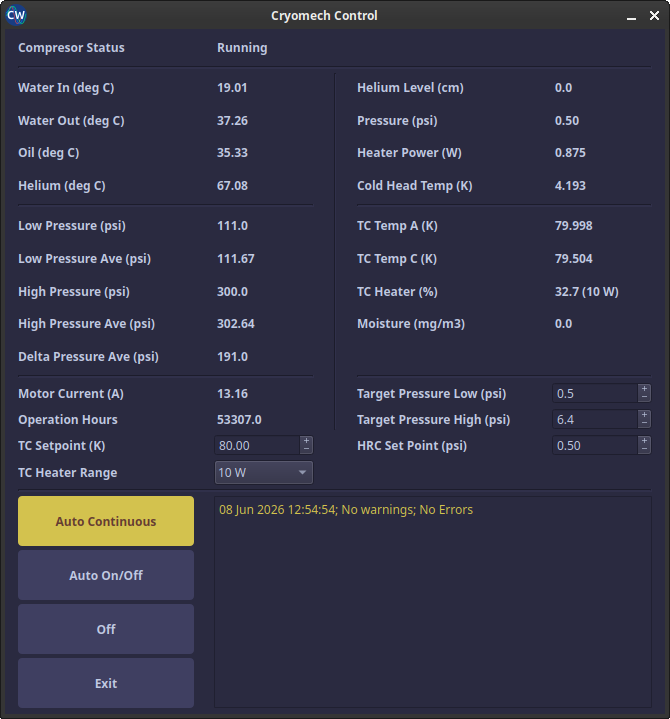
Besides displaying the readouts, the window lets the operator:
- set the HRC Set Point (LM-510 helium recondenser target pressure);
- set the Lakeshore 340 TC Setpoint and TC Heater Range;
- choose one of three compressor operating modes (see below).
Front-panel edits made directly on the instruments are synced back into the GUI on the next poll, so the displayed values always track the hardware.
Compressor operating modes
| Mode | Behaviour |
|---|---|
| Auto Continuous | Keeps the compressor running; restarts it automatically if it is found idling. |
| Auto On/Off | Cycles the compressor between the Target Pressure Low and Target Pressure High thresholds to hold the helium pressure in a band. |
| Off | Stops the compressor and keeps it off. |
Logging
Every reading is appended to a tab-separated log file (Cryomech.log, one row per minute, rotated weekly). The bundled Log Analyzer window plots any logged quantity (temperatures, pressures, helium level, moisture, motor current, …) against time using the Atomize liveplot graphics, which makes it easy to review long-term trends and diagnose problems after the fact.
Telegram bot
A Telegram bot provides remote monitoring and control from a phone. After authorizing a chat ID, the operator can:
- request a screenshot of the control window;
- read the last log line and the current operating mode;
- read the temperature-controller data;
- switch the compressor between Auto On/Off, Auto Continuous, and Off;
- set the TC setpoint (
sp50→ 50 K) and heater range (sh10/sh1/shoff).
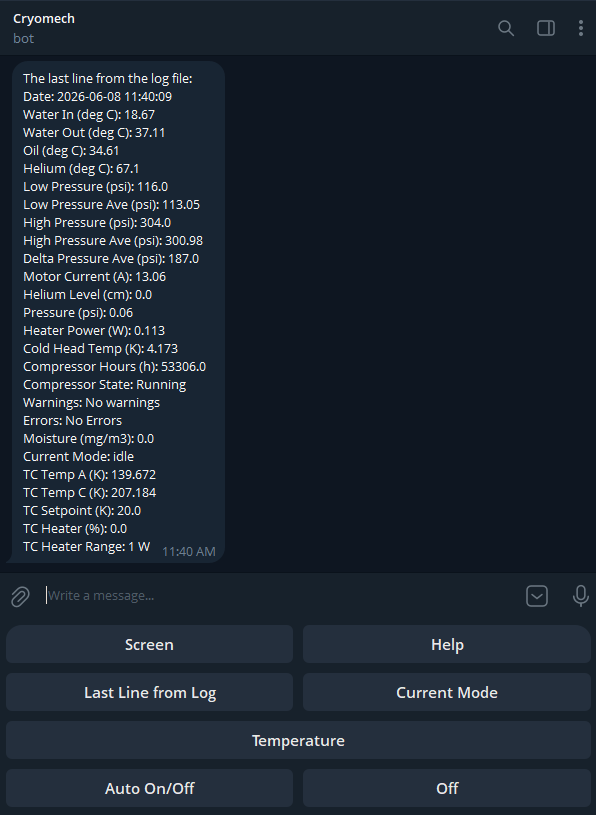
Commands sent from the bot are handed to the control window through a small file-based handshake, so the bot never talks to the instruments directly — the control window remains the single owner of all device I/O.
Autostart
On Linux the control center can be launched at login (atomize-itc --autostart), in which case it comes back up in the same operating mode the previous session was in, so a power cycle does not interrupt the cryogenic automation.