Writing Modules
Please, read these rules carefully and try to follow them when writing a new module.
- Function Naming
- Function Clustering
- Device Class
- Class init() function
- Limits, Ranges, and Dictionaries
- Configuration Files
- Device Specific Configuration Parameters
- SI Unit Suffix
- Pyqtgraph SI Unit Suffix
- Test Run
- Error Messages
Function Naming
It is highly recommended to use pre-existing function names when writing a module for a device class that is already present in Atomize. Also do not forget to change the documentation accordingly, if there are any peculiarities in using of your function.
Function Clustering
If it is possible, the same function should be able to query and set the target value:
# initialization of the device module
sr830 = sr.SR_830()

# setting the time constant to 30 ms
sr830.lock_in_time_constant('30 ms')
# requesting the current value of the time constant
current_time_constant = sr830.lock_in_time_constant()
In this example the same function lock_in_time_constant() sets and queries the time constant of the SR-830 lock-in amplifier.
Device Class
All functions should be combined into one class. The class must have the name of the module file:
# device module of the SR-860 lock-in amplifier
class SR_860:
    # ... #

    def method_1(self):
        # method 1 content
    def method_2(self):
        # method 2 content
Class init() Function
The class inizialization function should connect computer to the device. A general example is given below, more examples can be found in the atomize/device_modules/ directory.
# Stanford Research Systems SR-860 module
import pyvisa
from pyvisa.constants import StopBits, Parity

# ... #

# a part of the inizialization method
def __init__(self):
    # ... #

    # instruments are not connected to the PC in test runs
    # more information about test runs are given below
    if self.test_flag != 'test':
        # more information about config files are given below
        if self.config['interface'] == 'gpib':
                # ... #

                # Gpib driver may not be installed on the PC
                import Gpib
                self.device = Gpib.Gpib(self.config['board_address'], self.config['gpib_address'],
                                    timeout = self.config['timeout'])

                # ... #

        elif self.config['interface'] == 'rs232':
            try:
                self.status_flag = 1
                rm = pyvisa.ResourceManager()
                self.device = rm.open_resource(self.config['serial_address'],
                    read_termination=self.config['read_termination'],
                    write_termination=self.config['write_termination'],
                    baud_rate=self.config['baudrate'], data_bits=self.config['databits'],
                    parity=self.config['parity'], stop_bits=self.config['stopbits']),
                    self.device.timeout = self.config['timeout']

                # ... #

        elif self.config['interface'] == 'ethernet':
            try:
                self.status_flag = 1
                rm = pyvisa.ResourceManager()
                self.device = rm.open_resource(self.config['ethernet_address'])
                self.device.timeout = self.config['timeout']

                # ... #
Limits, Ranges, and Dictionaries
Specify ranges and limits for the device inside an init() function of the device class and use (if possible) dictionaries for matching device specific syntax and general high-level Atomize function arguments:
# examples of auxiliary dictionaries
# certain number of points
self.points_list = [100, 250, 500, 1000, 2000, 5000, 10000, 20000,
                    50000, 100000, 200000, 500000]
# certain trigger modes
self.ref_slope_dict = {'Sine': 0, 'PosTTL': 1, 'NegTTL': 2}
# certain acquisition types
self.ac_type_dic = {'Normal': "NORM", 'Average': "AVER",
                     'Hres': "HRES",'Peak': "PEAK"}

# examples of limits
# minimum amplitude of the generated signal
self.ref_ampl_min = 0.004
# maximum amplitude of the generated signal
self.ref_ampl_max = 5
Configuration Files
Each device should have a configuration file. In this file the communication protocol settings and device specific parameters in the case of a module for a series of the devices should be specified. Examples can be found in atomize/device_modules/config/ directory with a local copy in “DEVICE CONFIG DIRECTORY”. Reading of a local copy of the configuration file should be done inside an init() function of the device class using special functions from the config_utils and local_config modules:
# Stanford Research Systems SR-860 module

import atomize.main.local_config as lconf
import atomize.device_modules.config.config_utils as cutil

# ... #

# a part of the inizialization method
def __init__(self):

    # setting path to *.ini file
    self.path_current_directory = lconf.load_config_device()
    self.path_config_file = os.path.join(self.path_current_directory, 'SR_860_config.ini')

    # getting of the configuration data
    self.config = cutil.read_conf_util(self.path_config_file)
    self.specific_parameters = cutil.read_specific_parameters(self.path_config_file)

    # content of the self.config; the corresponding configuration file is given below
    # self.config['interface'] = 'ethernet'
    # self.config['board_address'] = 0
    # self.config['gpib_address'] = 12
    # self.config['serial_address'] = 'ASRL/dev/ttyUSB0::INSTR'
    # etc.

    # ... #
The corresponding config.ini file is as follows:
# Stanford Research Systems SR-860 config.ini file
[DEFAULT]
name = SR 860 Lock-in Amplifier
type = ethernet
timeout = 1000

[GPIB]
board = 0
address = 12

[SERIAL]
address = ASRL/dev/ttyUSB0::INSTR
baudrate = 9600
databits = 8
startbits = 1
stopbits = one
parity = none
read_termination = r
write_termination = n
flow_control = 0

[MODBUS]
mode =
slave_address =

[ETHERNET]
address = TCPIP::192.168.2.20::INSTR

[SPECIFIC]
Device Specific Configuration Parameters
When you write a module for a series of the devices, it is convenient to specify some parameters in the configuration file. For example, the number of analog channels of an oscilloscope or a temperature controller loop. In this case, the module should work universally at any given values of specific device parameters.
# Rigol DP832 config.ini file

# ... #

[SPECIFIC]
# this power supply has 3 channels
channels = 3
# ... #
SI Unit Suffix
Currently Atomize does not use the dimensions of physical units (current, frequency etc.), instead, special dictionaries are used:
# for parameters with time dimension
self.timebase_dict = {'s': 1, 'ms': 1000, 'us': 1000000,'ns': 1000000000}
 # for parameters with voltage dimension
self.scale_dict = {'V': 1, 'mV': 1000}
In order to take into account different scaling factors usually the value and scaling factor are treated independently:
# Rigol DP800 Series module

# ... #

# a part of the inizialization method
def __init__(self):
    # ... #

    # auxilary dictionaries and limits
    self.current_dict = {'A': 1, 'mA': 1000}
    self.channel_dict = {'CH1': 1, 'CH2': 2, 'CH3': 3}
    self.current_min = 0.
    self.channels = int(self.specific_parameters['channels'])
    self.current_max_dict = {'CH1': int(self.specific_parameters['ch1_current_max']),
                             'CH2': int(self.specific_parameters['ch2_current_max']),
                             'CH3': int(self.specific_parameters['ch3_current_max'])}

    # ... #

# a part of the power_supply_current method
def power_supply_current(self, *current):
    # ... #

    if len(current) == 2:
        # processing of arguments
        ch = str(current[0])
        temp = current[1].split(" ")
        curr = float(temp[0])
        scaling = temp[1]

        # processing of number of channels
        if ch in self.channel_dict:
            flag = self.channel_dict[ch]

            if flag <= self.channels:
                curr_max = self.current_max_dict[ch]

                # correction of the current by the indicated scale
                if scaling in self.current_dict:
                    coef = self.current_dict[scaling]
                    if curr / coef >= self.current_min and curr / coef <= self.current_max:
                        device_write(':SOURce' + str(flag) + ':CURRent' + str(curr / coef))

                        # ... #
Searching of a key can be done using a special function from the config_utils.py file:
# Stanford Research Systems SR-830 module

import atomize.device_modules.config.config_utils as cutil

# ... #

# a part of the inizialization method
def __init__(self):
    # ... #

    self.timeconstant_dict = {'10 us': 0, '30 us': 1, '100 us': 2, '300 us': 3,
                    '1 ms': 4, '3 ms': 5, '10 ms': 6, '30 ms': 7, '100 ms': 8, '300 ms': 9,
                    '1 s': 10, '3 s': 11, '10 s': 12, '30 s': 13, '100 s': 14, '300 s': 15,
                    '1 ks': 16, '3 ks': 17, '10 ks': 18, '30 ks': 19}

    # ... #

# a part of the lock_in_time_constant method
def lock_in_time_constant(self, *timeconstant):
    # ... #

    elif len(timeconstant) == 0:
        raw_answer = int(self.device_query("OFLT?"))

        # conversion of the raw answer to a readable string
        answer = cutil.search_keys_dictionary(self.timeconstant_dict, raw_answer)
        return answer
Pyqtgraph SI Unit Suffix
Another option is to use pyqtgraph helper functions. They can be used to convert numbers to strings with appropriate SI unit suffix:
# Keysight_2000_Xseries module

import pyqtgraph as pg

# ... #

# a part of the oscilloscope_time_resolution method
def oscilloscope_time_resolution(self):
    raw_answer = float(self.device_query(":TIMebase:RANGe?"))

    # conversion of the raw answer to a string with appropriate SI unit suffix
    answer = pg.siFormat( raw_answer, suffix = 's', precision = 9, allowUnicode = False)

   # ... #
Pyqtgraph helper functions are also very useful in situations when only a discrete set of values is possible for a parameter. Two special functions from the config_utils.py file can be used in this case. The first one is parse_pg() that parses an input with different suffix; the second one is search_and_limit_keys_dictionary() that can be used to find a closest available value for the parameter within the specified limits:
parse_pg(str_to_parse: int/float + 'SI unit suffix',
        helper_list: list_of_available_values) -> parsed_value, int_value, int: [0, 1]
This function parses an input string {str_to_parse}, i.e. ‘20 ms’, to closest available value from the {helper_tc_list}. The outputs are (i) parsed_value: string with SI unit suffix, e.g. ‘10 ms’; (ii) int_value: integer from the parsed string, e.g. 10; (iii) integer: [0, 1], which can be used to create warning message about a change in value.
search_and_limit_keys_dictionary(dict_to_search: dictionary,
        search_value: int/float + 'SI unit suffix',
        min_value: float, max_value: float) -> dict_value, dict_key, int: [0, 1]
This function checks that the input value {search_value}, i.e. ‘10 ms’, is within the specified limits {min_value, max_value} and finds appropriate value in the dictionary {dict_to_search} using the input value {search_value} as the key. The outputs are (i) dict_val: value found in the dictionary {dict_to_search}; (ii) val_key: key found for this value; (iii) integer: [0, 1], which can be used to create warning message about a change in value.
The typical example from the device module is as follows:
# Stanford Research Systems SR-810 module

import atomize.device_modules.config.config_utils as cutil

# ... #

# a part of the inizialization method
def __init__(self):
    # ... #

    self.timeconstant_dict = {'10 us': 0, '30 us': 1, '100 us': 2, '300 us': 3,
                        '1 ms': 4, '3 ms': 5, '10 ms': 6, '30 ms': 7, '100 ms': 8, '300 ms': 9,
                        '1 s': 10, '3 s': 11, '10 s': 12, '30 s': 13, '100 s': 14, '300 s': 15,
                        '1 ks': 16, '3 ks': 17, '10 ks': 18, '30 ks': 19}
    self.helper_tc_list = [1, 3, 10, 30, 100, 300, 1000]

    # ... #

# a part of the lock_in_time_constant method
def lock_in_time_constant(self, *timeconstant):
    # ... #

    if len(timeconstant) == 1:
        tc = timeconstant[0]

        # parse an input string {tc} to closest available value
        # from the {self.helper_tc_list}
        # parsed_value: str with SI unit suffix, e.g. '10 ms'
        # int_value: integer value from the parsed string, e.g. 10
        # a: integer that can be used to create warning message
        parsed_value, int_value, a = cutil.parse_pg(tc, self.helper_tc_list)

        # check that the parsed value is within the specified limits {10e-6, 30e3}
        # find appropriate value in {self.timeconstant_dict} using the key {parsed_value}
        # val: value found in the dictionary
        # val_key: key for this value
        # b: integer that can be used to create warning message
        val, val_key, b = cutil.search_and_limit_keys_dictionary( self.timeconstant_dict,
                            parsed_value, 10e-6, 30e3 )
        self.device_write("OFLT "+ str(val))

        # warning message about parameter change
        if ( a == 1 ) or ( b == 1 ):
            general.message(f"TC cannot be set, the nearest available value of {val_key} is used")

    # ... #
Test Run
There is a test section in Atomize. During the test software checks that an experimental script has appropriate syntax and does not contain logical errors. It means that all the parameters during script execution do not go beyond the device limits. For instance, the test can detect that the field of the magnet is requested to be set to a value that the magnet cannot produce. During the test run the devices are not accessed, calls of the wait() function do not make the program sleep for the requested time, graphics are not drawn etc. To print a string in the main window in the test run, the function message_test() from the general_functions module can be used.
The execution flow of experimental scripts can be illustrated as follows:
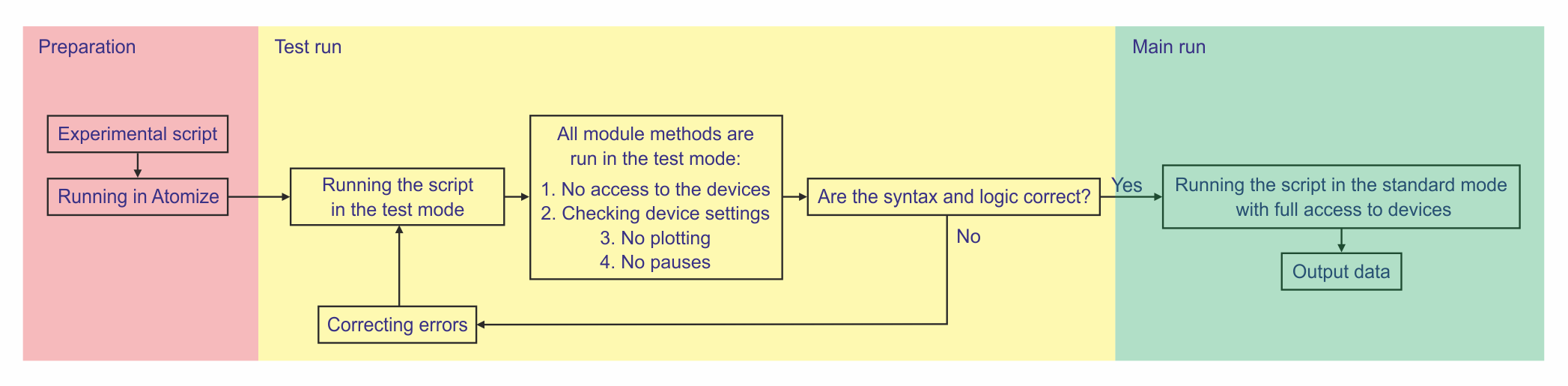
After an experimental script is written and launched in Atomize, a test run is performed, in which there is no access to the devices used. Test runs only check the correctness of device settings, experiment logic, and syntax. If there are no errors in the script, after the test run, the same script is immediately executed in the standard mode with full access to the instruments used.
In order to be able to run a test, one should specify inside a module appropriate values for all the device parameters (since the devices are not accessed) and describe what the function should do during the test run. Typically, it is just different assertions and checkings:
# Stanford Research Systems SR-830 module

# a part of the __init__ method:
# minimum amplitude of the sine output
self.ampl_min = 0.004
# maximum amplitude of the sine output
self.ampl_max = 5

# ... #

# special test value for the test run
self.test_amplitude = 0.3

# ... #

# Stanford Research Systems SR-830 module
# test run part of the lock_in_ref_amplitude() method:
# 1) this method queries or sets the amplitude of the sine output
# 2) if there is no argument the function will return the current level
# 3) if there is an argument the specified amplitude will be set
# 4) the argument is a string with SI unit suffix, such as “0.150 mV”
def lock_in_ref_amplitude(self, *amplitude):
    # ... #

    elif self.test_flag == 'test':
        if len(amplitude) == 1:
            ampl = float(amplitude[0])
            assert(ampl <= self.ampl_max and ampl >= self.ampl_min),
            f"Invalid frequency. The available range is from {self.ampl_min} to {self.ampl_max}"

        elif len(amplitude) == 0:
            answer = self.test_amplitude
            return answer

    # ... #
The test_flag parameter is used to indicate the start of the test and it is usually defined in the inizialization method:
# Stanford Research Systems SR-830 module

import sys

# ... #

# a part of the inizialization method
def __init__(self):
    # ... #

    # test_flag definition for the test run
    if len(sys.argv) > 1:
        self.test_flag = sys.argv[1]
    else:
        self.test_flag = 'None'

    # ... #
Error Messages
It is recommended to write detailed assertion error messages, which can include argument types and argument limits. Below are several examples from various device modules:
# Stanford Research Systems SR-830 module

# argument types; string with SI unit suffix
# self.timeconstant_dict = {'10 us': 0, '30 us': 1, '100 us': 2, '300 us': 3, ... }
assert(val_key in self.timeconstant_dict),
        "Incorrect argument; tc: int + [' us', ' ms', ' s', ' ks']"

# argument limits with pyqtgraph helper function
# self.ref_ampl_min = 0.004
# self.ref_ampl_max = 5
min_a = pg.siFormat( self.ref_ampl_min, suffix = 'V', precision = 3, allowUnicode = False)
max_a = pg.siFormat( self.ref_ampl_max, suffix = 'V', precision = 3, allowUnicode = False)
assert(ampl <= self.ref_ampl_max and ampl >= self.ref_ampl_min), \
            f"Incorrect amplitude. The available range is from {min_a} to {max_a}"

# argument types; predefined options
# self.ref_mode_dict = {'Internal': 1, 'External': 0}
assert( md in self.ref_mode_dict ), f"Incorrect mode; mode: {list(self.ref_mode_dict.keys())}"

# Keysight_3000_Xseries module

# argument types; predefined options
#self.channel_dict = {'CH1': 'CHAN1', 'CH2': 'CHAN2', 'CH3': 'CHAN3', 'CH4': 'CHAN4'}
assert(ch in self.channel_dict),
        f'Invalid channel; channel: {list(self.trigger_channel_dict.keys())}'